Windows 11 Home 升级Pro,不需重装也能做到
今天遇到一个实际案例:
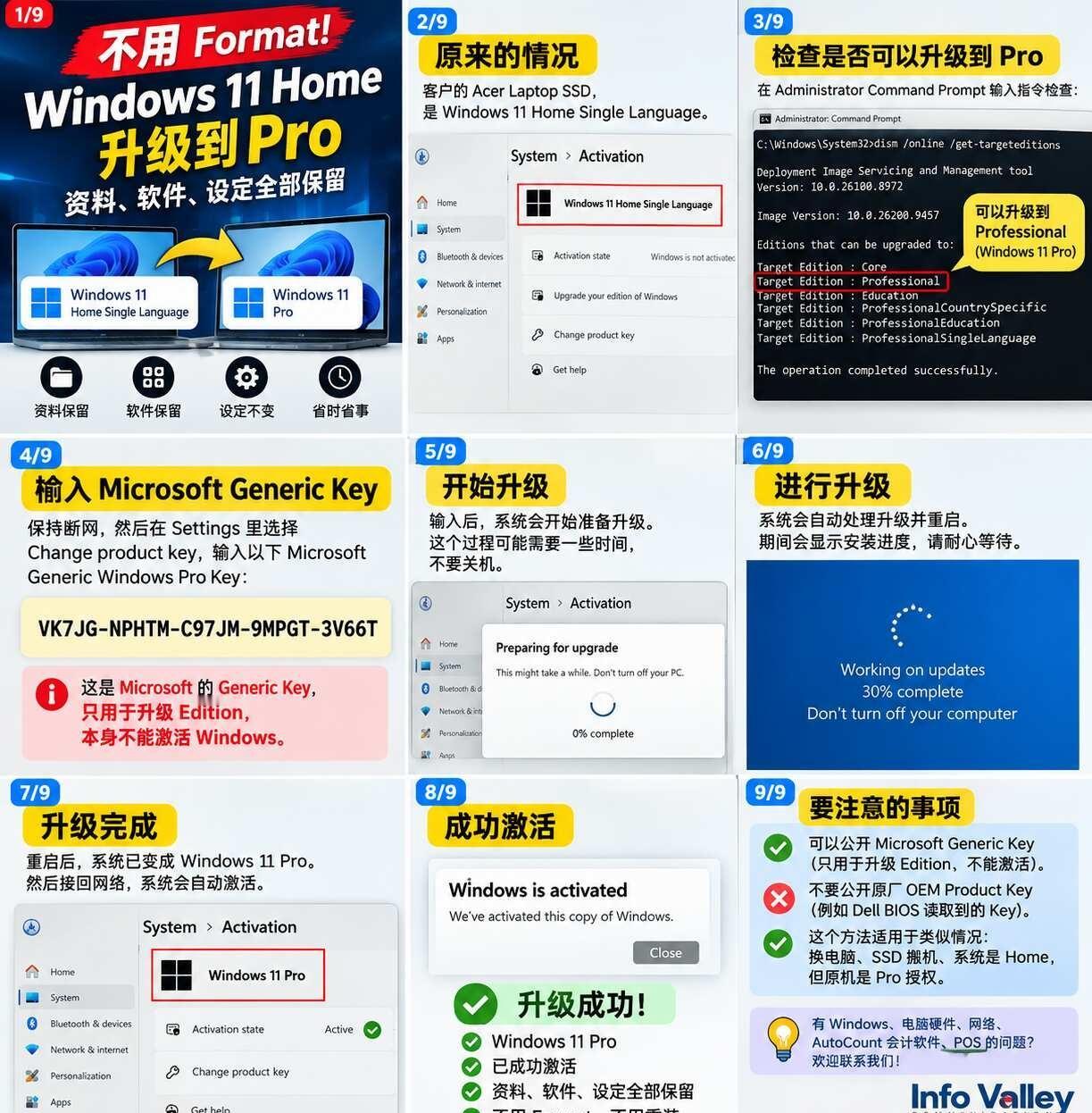
原本 Acer Laptop 的 SSD 是 Windows 11 Home Single Language,现在把 SSD 搬到一台原装有 Windows Pro 授权的 Dell OptiPlex。
因为里面已经有软件、资料和原来的 Settings,所以目标是:
不 Format、不重装 Windows、保留软件和资料,直接 Home → Pro。
Step 1|先检查 Windows 是否支持升级 Pro
用 Administrator Command Prompt:
DISM /Online /Get-TargetEditions
检查结果看到:
Target Edition : Professional
代表这套 Windows 可以升级到 Pro。
Step 2|断开 Internet
拔掉 LAN Cable / 关闭 Wi-Fi。
然后进入:
Settings → System → Activation → Upgrade your edition of Windows → Change product key
输入 Microsoft Windows Pro Generic Key:
VK7JG-NPHTM-C97JM-9MPGT-3V66T
系统开始:
Preparing for upgrade → Restart → Windows 11 Pro
Step 3|重新联网并 Activation
升级完成后重新连接 Internet。
这台 Dell 本身有合法的 Windows Pro OEM / Digital License,所以最后成功:
Windows 11 Pro ✅
Windows is activated ✅
原来的资料保留 ✅
原来的软件保留 ✅
不用 Format ✅
⚠️ 注意:
上面的 Generic Product Key 是 Microsoft 的 Generic Edition Upgrade Key,作用是切换到 Windows Pro Edition,它本身不是 Windows License,也不能让没有 Pro 授权的电脑免费激活 Windows Pro。
每台电脑最终还是需要合法的 Windows Pro License。
另外,电脑 BIOS / UEFI 内读取到的 OEM Product Key 不建议公开分享。
有时候换电脑、SSD 搬机,不一定第一时间就要 Format。
能保留客户原来的软件、资料和设定,才是真正省时间。
Info Valley
Computer • Windows • Networking • AutoCount Accounting • POS
Windows11 Windows11Pro 电脑维修 电脑知识 SSD DellOptiPlex ITSupport AutoCount